CocoFlix Apk Download

Looking for CocoFlix download information? This page covers the CocoFlix APK, app installation, device compatibility, version information, and common download-related issues in one place.
CocoFlix is commonly searched by users who want to explore an entertainment app and understand how its APK works on compatible Android devices. Before installing any APK, it is important to check the version, device requirements, file source, and permissions.
This guide explains what to know about the CocoFlix APK download process and how to approach installation safely.
CocoFlix Download at a Glance
| Information | Details |
|---|---|
| App | CocoFlix |
| File type | APK for compatible Android devices |
| Main purpose | Entertainment and media access |
| Primary platform | Android |
| Download type | APK / app installation |
| Compatibility | Depends on the version and device |
| Installation | Android package installation |
| Latest version | Check the version information before installing |
What Is CocoFlix?
CocoFlix is an entertainment-focused application associated with movie and TV-show browsing and streaming. Users searching for CocoFlix app download may encounter different versions and websites offering APK files.
Because third-party APK files can vary, it is important to distinguish between information about the app itself and a particular APK file hosted by a website.
If you are looking for detailed information about the application, its features, and supported devices, see our complete CocoFlix App guide.
CocoFlix APK Download
The term CocoFlix APK generally refers to the Android package file used to install an application outside the standard app-store installation process.
An APK can be useful when an application is not available through the usual app distribution method, but the source of the file matters. Different websites may host files with different versions, modifications, or permissions.
Before downloading a CocoFlix APK, check:
- APK version number
- File size
- Android compatibility
- Update date
- Required permissions
- File source
- Whether the APK has been modified
- Whether your device supports the required Android version
Avoid installing an APK simply because a website describes it as “latest,” “official,” or “verified.” Those labels should be supported by evidence rather than taken at face value.
CocoFlix APK Download vs CocoFlix App
These terms are often used interchangeably, but they can mean slightly different things.
CocoFlix app usually refers to the installed application or the application experience itself.
CocoFlix APK refers specifically to the Android installation package.
For example, when someone searches for CocoFlix Download Apk, they are generally looking for an APK file that can be installed on an Android device.
Understanding this difference can help you avoid downloading an unrelated or modified file.
CocoFlix Download for Android
Android users should first check whether their device meets the requirements of the particular CocoFlix version they intend to install.
Before installation:
- Check your Android version.
- Check the APK’s stated compatibility.
- Make sure you have enough storage space.
- Download only from a source you trust.
- Review the requested permissions.
- Scan unfamiliar files with your device’s security tools.
- Keep your Android system and security updates current.
If the APK does not support your Android version, installation may fail even when the file itself is intact.
How to Install CocoFlix APK
If you have obtained a legitimate APK from a source you trust, the general Android installation process is straightforward.
Step 1: Check the APK
Before opening the file, verify its name, version, source, and compatibility with your device.
Step 2: Review Android Security Settings
Recent Android versions may restrict installation of applications obtained outside the standard app distribution system.
Only change security settings when you understand what you are allowing, and avoid enabling installation permissions for unknown apps unnecessarily.
Step 3: Open the APK
Locate the downloaded APK using your device’s file manager and select it to begin installation.
Step 4: Review Permissions
Pay attention to the permissions requested by the application. Permissions should make sense for the application’s stated functionality.
Step 5: Complete Installation
If Android accepts the package and the requirements are satisfied, follow the on-screen instructions to finish installation.
Step 6: Open the App
After installation, open CocoFlix and check that the application works correctly on your device.
If Android displays a security warning or the package fails verification, don’t ignore the warning simply to complete the installation.
CocoFlix Download for Android TV
Users searching for CocoFlix APK for Android TV should pay particular attention to TV compatibility.
A mobile Android application does not automatically provide a good Android TV experience. Interface design, navigation, screen orientation, remote-control support, and Android TV compatibility can vary between applications and versions.
Before installing an APK on Android TV, check:
- Android TV version
- APK compatibility
- Screen and interface support
- Remote navigation
- Available storage
- Required permissions
A version designed specifically for television devices may behave differently from a mobile version.
CocoFlix Download for Smart TV
Smart TV compatibility depends on the operating system used by the television.
Android-based televisions may support Android applications, while other Smart TV platforms can use different application formats and distribution systems.
Therefore, don’t assume that an Android APK will work on every Smart TV.
Check your television’s operating system and supported application format before attempting installation.
CocoFlix Download for Fire TV / Firestick
Fire TV devices use an Android-based platform, but compatibility can still vary between applications and APK versions.CocoFlix App
If you are considering CocoFlix for Fire TV or Firestick, verify that the particular application version supports the device and that its interface works properly with a TV remote.
For device-specific instructions, see our dedicated CocoFlix Fire TV guide.
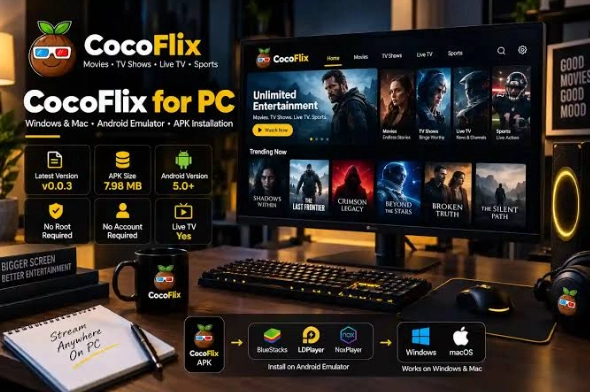
CocoFlix for PC
An Android APK is not normally a native Windows or macOS application.
If you want to use an Android application on a computer, compatibility may depend on the environment or Android-compatible software being used.
Before installing anything on a PC, check whether a genuine desktop version exists and avoid downloading unknown executable files that are simply described as a “CocoFlix PC version.”
CocoFlix Latest Version
When searching for CocoFlix latest version, don’t rely only on a page title or filename.
A reliable version check should consider:
- Version number
- Release or update date
- Changelog, when available
- Android requirements
- File size
- Compatibility
- Source of the APK
A newer file is not automatically the right file for every device.
For detailed version information, visit our CocoFlix Latest Version page.
Why Is CocoFlix APK Not Installing?
There are several possible reasons an APK may fail to install.
Incompatible Android Version
The application may require a newer or different Android version than the one installed on your device.
Corrupted Download
An incomplete or damaged APK may fail during installation. Downloading the same file repeatedly from unreliable sources is not a good solution.
Insufficient Storage
Your device needs enough available storage to install and run an application.
Existing App Conflict
An existing installation with a different signature or package version can sometimes cause installation conflicts.
Unsupported Device
Some APK versions may be designed for particular devices or architectures.
Security Restrictions
Android may block an APK because of security settings, package verification, or other system protections.
CocoFlix Download Problems
If CocoFlix installed successfully but doesn’t work as expected, the problem may not be the download itself.
Common issues include:
- App not opening
- App crashing
- Content not loading
- Search not responding
- Playback problems
- Compatibility errors
- Outdated application version
- Network-related problems
Try checking the application version, device compatibility, internet connection, available storage, and Android system version before reinstalling.
Is CocoFlix APK Safe?
The safety of an APK depends on the particular file and its source. The name “CocoFlix APK” alone does not establish that a file is safe.
Before installing an APK from outside a standard app store, consider:
- Who published or hosts the file?
- Does the file have a clear version number?
- Are the permissions reasonable?
- Does the file behave as expected?
- Is the download source reputable?
- Does your device’s security software flag it?
Be particularly cautious with modified APKs, because modifications can change an application’s behavior and permissions.
What About CocoFlix Mod APK?
Searches for CocoFlix mod APK and CocoFlix mod APK download are common, but a modified APK should not be treated as the same thing as the original application.
A modified package may contain changes made by an unknown third party. These changes can affect functionality, permissions, privacy, and security.
For that reason, this site does not recommend downloading or distributing unauthorized modified APK files.
If your goal is simply to understand what a CocoFlix mod APK is and how it differs from a standard APK, see our dedicated CocoFlix Mod APK information guide.
CocoFlix Download: Things to Check Before Installing
Use this checklist before installing any APK:
- Confirm the application name
- Check the APK version
- Check Android compatibility
- Review the file source
- Check the file size
- Review permissions
- Scan the file when appropriate
- Keep your device updated
- Avoid suspicious modified packages
- Keep a backup of important data
These simple checks can reduce the risk of installing an unwanted or incompatible application.
Frequently Asked Questions
What is CocoFlix Download?
CocoFlix Download generally refers to obtaining the CocoFlix application or its Android APK for installation on a compatible device.
What is CocoFlix APK?
CocoFlix APK refers to the Android package file used to install a CocoFlix application on a compatible Android device.
Where can I find CocoFlix APK Download information?
This page provides information about the APK, compatibility, installation, version checking, and common download issues. Always verify the source of an APK before installing it.
Is CocoFlix APK available for Android?
An APK is an Android application package, but whether a particular CocoFlix version works on your device depends on its compatibility requirements.
Can I install CocoFlix APK on Android TV?
Compatibility depends on the APK version and Android TV device. A mobile APK is not automatically optimized for Android TV.
Can CocoFlix APK work on Smart TV?
Only compatible Android-based Smart TVs may support an Android APK. Other Smart TV operating systems use different application formats.
Can I use CocoFlix on a PC?
An Android APK is not normally a native Windows or macOS application. PC compatibility depends on the method being used and whether a suitable desktop version exists.
Why is my CocoFlix APK not installing?
Common causes include an incompatible Android version, insufficient storage, a damaged APK, package conflicts, or Android security restrictions.
Should I install a CocoFlix Mod APK?
Modified APKs come from third parties and may differ substantially from the original application. Check the source and security implications carefully before installing any modified package.
How do I check the CocoFlix latest version?
Check the application’s version information and compare it with the version details provided by a reliable source. Don’t rely solely on filenames or claims such as “latest.”
CocoFlix Download vs App Store Installation
There are two different installation approaches users may encounter:
| APK Installation | Standard App Installation |
|---|---|
| Uses an APK package | Uses an app distribution platform |
| May require additional Android permissions | Usually handled by the platform |
| User must verify the file source | Platform provides distribution controls |
| Version must be checked manually | Updates may be handled automatically |
| Greater responsibility for file verification | More centralized installation process |
The appropriate option depends on the availability of the application and the user’s device.
Final Thoughts
The CocoFlix Download search can refer to several different things, including the CocoFlix APK, the application itself, a particular version, or installation instructions for a specific device.
Before downloading anything, focus on the details that matter: source, version, compatibility, permissions, and security.
If you’re looking for a specific installation method, explore our Android, Android TV, Fire TV, Smart TV, and PC guides. For version-related information, see the CocoFlix Latest Version guide.
The goal is simple: understand the application and the file you are installing before putting it on your device.