CocoFlix

What Is CocoFlix?
CocoFlix is associated with an entertainment-focused application and content discovery experience. Users commonly search for CocoFlix, Coco Flix, or the CocoFlix app when looking for information about movies, TV shows, app features, compatibility, and installation.
Because app versions and availability can change over time, information about CocoFlix should always be checked against the specific version and source being used. This is particularly important when looking for APK files or information about compatibility with different devices.
CocoFlix at a Glance
| Information | Details |
|---|---|
| App name | CocoFlix |
| Category | Entertainment |
| Common searches | CocoFlix, Coco Flix, CocoFlix app |
| Android package | CocoFlix APK |
| Device information | Depends on the specific version |
| Version information | Check the latest verified release |
CocoFlix App
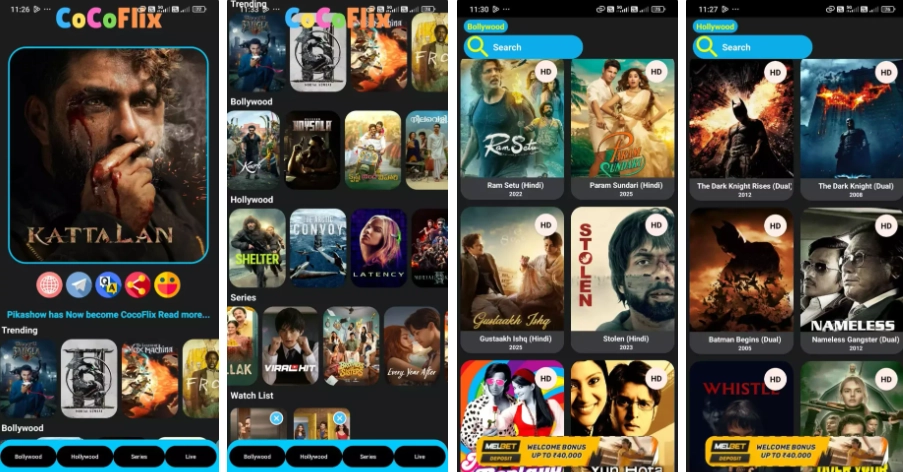
The CocoFlix app is the main subject behind many searches for the brand. Visitors generally want to know what the application offers, how its interface works, which devices it supports, and where they can find reliable information about updates.
A useful entertainment application should make it straightforward to discover content, search for titles, browse categories, and access relevant information. The exact features available can vary between versions, so users should check current app information rather than relying on outdated descriptions.
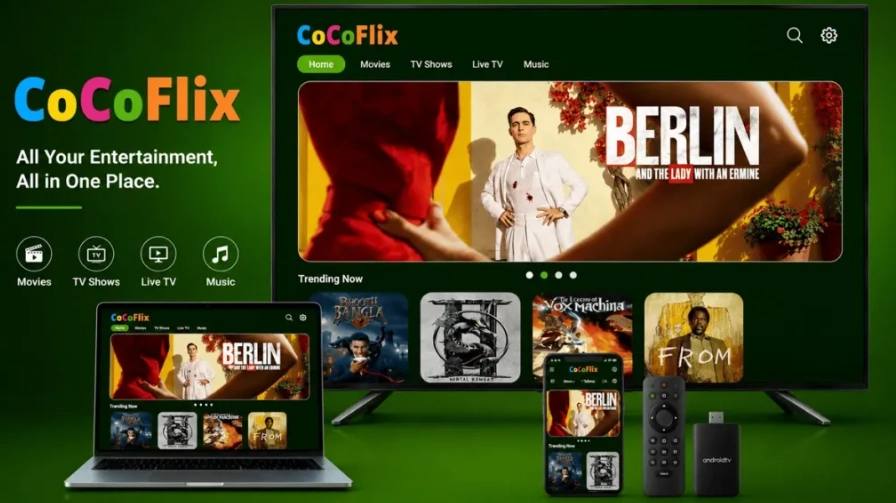
CocoFlix App Interface
The interface is an important part of any entertainment application. Users typically expect clear navigation, accessible search functionality, organized categories, and an easy way to move between different sections.
When evaluating a particular CocoFlix version, pay attention to the actual interface and available features instead of relying only on promotional descriptions.
CocoFlix App Experience
A good app experience depends on several factors, including device compatibility, internet connection, application version, content availability, and playback support.
Keeping the application and device software up to date can also help avoid compatibility problems when newer versions become available.
CocoFlix Features
The features available through CocoFlix can vary according to the application version and platform. Some of the areas users commonly want to learn about include content discovery, search, categories, playback, and device compatibility.
User-Friendly Interface
Clear navigation helps users find movies, shows, categories, and other sections without unnecessary steps. An organized interface can make the overall browsing experience easier, particularly on larger screens such as televisions.
Content Discovery
Content discovery is an important part of an entertainment platform. Categories, search tools, popular titles, and organized collections can help users find something to watch without having to browse randomly.
Search and Categories
A useful search system allows visitors to look for a specific movie or show, while categories can make broader discovery easier. Genre and year-based organization can also help users narrow down their choices.
Playback Features
Playback functionality depends on the specific version and device. Users should check the actual application’s available controls and supported playback options before assuming that a particular feature is available.
Streaming Quality
The viewing experience can depend on the available source, internet connection, device capabilities, and application version. A stable connection and compatible hardware can make a significant difference to playback quality.
Language Options
Language availability can vary by title and source. If multilingual content is important to you, check the available language options for the specific title rather than assuming every movie or show supports the same languages.
Device Compatibility
CocoFlix-related searches include Android phones, Android TV, Smart TVs, Fire TV devices, and computers. Compatibility should always be confirmed for the specific version because application requirements can change.
Updates
Application updates can introduce changes, improvements, compatibility adjustments, or fixes. Before installing or updating any application, check that the version comes from a trustworthy source and matches your device.
CocoFlix APK
An APK, or Android Package Kit, is the package format used to install applications on Android devices. This is why users searching for CocoFlix APK are generally looking for Android-specific application information.
The term “APK” refers to the application package itself; it does not automatically indicate that a particular file is official, safe, current, or authorized.
What Is CocoFlix APK?
CocoFlix APK generally refers to an Android application package associated with CocoFlix. If you encounter an APK file online, check its source, version information, permissions, and authenticity before installing it.
Avoid downloading APK files from unknown websites simply because they appear in search results.
CocoFlix APK Download Information
People often search for variations such as:
- CocoFlix APK download
- CocoFlix apk download
- CocoFlix Download
- CocoFlix Download Apk
These searches indicate a strong installation intent. However, users should verify the source and file before downloading or installing any third-party Android package.
If a download source cannot establish where the file came from or what has been changed in it, it is better to avoid installing the file.
CocoFlix APK Requirements
APK compatibility depends on the Android version, device hardware, application requirements, and the particular release.
Before installation, check:
- Android version requirements
- Device compatibility
- Available storage
- Required permissions
- File authenticity
- Version information
How to Install an APK
Android users should only install application packages from sources they trust and should review the file and requested permissions before proceeding.
If an APK has been modified, repackaged, or obtained from an unknown source, additional security risks may exist.
CocoFlix APK vs CocoFlix App
The terms are related but not identical.
CocoFlix app refers to the application users run on their device, while CocoFlix APK generally refers to the Android installation package used to install an application.
Understanding this distinction can make it easier to find the correct information when searching for installation or version details.

CocoFlix Latest Version
Another common search is CocoFlix latest version. Users searching for the latest version usually want to know whether an updated release is available, what has changed, and whether their device remains compatible.
What’s New in the Latest Version?
Version changes should be based on actual release information. Depending on the release, updates may involve bug fixes, compatibility changes, interface adjustments, or other improvements.
We recommend checking the release information associated with the specific version instead of relying on claims copied across unrelated websites.
CocoFlix Version Information
When evaluating a CocoFlix release, useful information can include:
- Version number
- Release or update date
- Supported platform
- File size
- System requirements
- Notable changes
Only verified information should be used when publishing these details.
How to Update CocoFlix
The safest update method depends on how the application was originally installed and where the legitimate update is distributed.
Before updating, make sure you know the source of the new version and that it is compatible with your device. Avoid replacing an existing application with an unknown package simply because it has a newer version number.
CocoFlix App 2026
Searches for CocoFlix app 2026 generally indicate users looking for current information rather than an older description.
Because application information can change during the year, current version details, device support, features, and availability should be reviewed whenever this page is updated.
CocoFlix on Different Devices
Device compatibility is one of the most common questions surrounding entertainment applications. The exact experience can differ depending on the platform.
CocoFlix for Android
Android users should check the application’s minimum Android requirements and verify that the particular release is compatible with their device.
CocoFlix for Android TV
A television interface has different requirements from a phone. Navigation, remote controls, screen layout, and compatibility should all be considered when evaluating CocoFlix on Android TV.
CocoFlix for Smart TV
However, Smart TV compatibility depends on the television’s operating system and the application’s supported platforms. Therefore, do not assume that an Android application will work directly on every Smart TV.
CocoFlix for Fire TV
Similarly, Fire TV devices have their own software environment and installation requirements. Therefore, users should verify compatibility and use trustworthy application sources.
CocoFlix for PC
If you want to use an Android application on a computer, the available options depend on the application’s official support and the operating system. Check current compatibility before attempting installation.
CocoFlix for iPhone and iPad
iOS and Android use different application distribution systems. Availability for iPhone and iPad should therefore be verified separately rather than assuming that an Android APK can be installed on an Apple device.
Explore Movies & TV Shows
Entertainment discovery is another reason users search for CocoFlix. A well-organized catalog can make it easier to find titles based on category, genre, release year, or popularity.
Movies
Movie discovery can be organized around:
- Popular movies
- Latest releases
- Genres
- Release years
- Regional categories
TV Shows
TV content can be organized by:
- Popular shows
- Latest additions
- Genres
- Seasons
- Episodes
However, the availability of individual movies and shows can vary by region, source, licensing arrangements, and application version.
Popular Genres
Common entertainment categories include:
- Action
- Comedy
- Drama
- Horror
- Romance
- Thriller
- Science fiction
- Animation
Browse by Year
Moreover, year-based browsing can help users find newer releases or explore older movies and shows. Therefore, categories should be kept accurate and updated as new content is added.
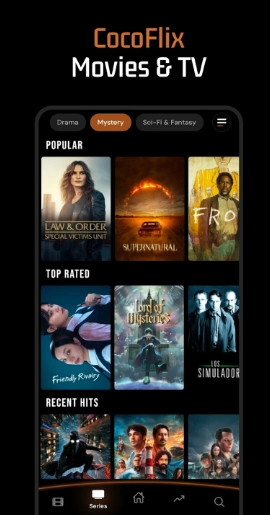
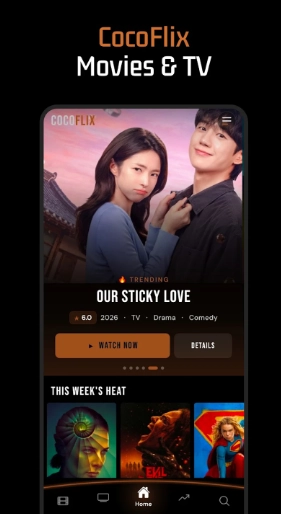
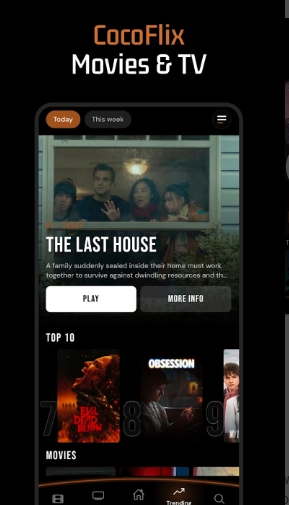
Hollywood, Bollywood & International Content
Entertainment audiences often search by region as well as genre.
Hollywood
Browse English-language and Hollywood-related titles where legally available through the relevant service or source.
Bollywood
Additionally, Bollywood and Hindi-language entertainment can be organized separately, making it easier for users interested in Indian cinema to discover relevant content.
South Indian & Regional Cinema
Regional categories can include relevant Tamil, Telugu, Malayalam, Kannada, and other language-based content where appropriate.
International Content
International movies and shows can be organized according to language, country, genre, or release year.
How to Use CocoFlix
The exact interface can change between versions, but the basic discovery process is straightforward.
Getting Started
Begin by checking the application version, compatibility, and source. Make sure the application is appropriate for your device before proceeding.
Searching for Movies and Shows
Use the search function to look for a specific title when available. If you don’t have a particular title in mind, browse the available categories.
Browsing Categories
Moreover, genre, year, language, and content-type categories can help narrow down a large catalog and, therefore, make content discovery easier.
Opening a Title
Before selecting a title, check its available information, including name, release year, genre, and other relevant details.
Managing Playback
Playback controls depend on the application’s version and the device being used. If playback problems occur, first check your connection and application compatibility.
CocoFlix Safety & Legal Information
Safety and legality are important considerations whenever users encounter third-party applications or APK files.
Is CocoFlix Safe?
There is no universal answer that applies to every file or version found online. Safety depends heavily on the source, file integrity, permissions, and whether the package has been modified.
Users should:
- Download only from trusted sources
- Check application permissions
- Keep device security software updated
- Avoid suspicious modified packages
- Be cautious of websites making unrealistic claims
- Verify files before installation
Is CocoFlix Legal?
The legal status of an application can depend on how it is distributed, what content it provides, whether that content is properly licensed, and the laws applicable in the user’s jurisdiction.
Users should verify the licensing status of content and comply with applicable copyright and local laws.
CocoFlix Troubleshooting Guide
Even when an application is compatible, users can encounter technical problems.
CocoFlix Not Opening
Check whether your device meets the application’s requirements and whether the installed version is compatible.
CocoFlix Not Loading
Check your internet connection and determine whether the issue affects other applications as well.
Playback Problems
Playback can be affected by connection quality, device performance, application compatibility, or the particular content source.
Search Not Working
Try restarting the application and checking whether the issue occurs with all searches or only specific titles.
Update Problems
Verify that the update comes from a trustworthy source and that the new version supports your device.
Compatibility Issues
Check the operating system version, device requirements, and application release information.
Installation Problems
If an installation package fails to install, don’t repeatedly try unknown files. First confirm the file source, device compatibility, available storage, and application requirements.
CocoFlix Alternatives
Users researching CocoFlix may also compare it with other entertainment applications and streaming services.
When comparing alternatives, useful factors include:
- Content availability
- Device support
- Subscription requirements
- Official availability
- Features
- Content licensing
- User interface
The right choice depends on the user’s individual requirements and the services legally available in their region.
CocoFlix vs Other Streaming Platforms
The CocoFlix can also be evaluated alongside subscription-based streaming services.
CocoFlix vs Subscription Streaming Services
A useful comparison should consider factual differences such as:
- Pricing and subscriptions
- Content licensing
- Supported platforms
- Availability by region
- Playback features
- Account requirements
Rather than assuming one platform is universally better, users should compare these factors according to their own needs.
CocoFlix vs Pikashow
Searches sometimes connect CocoFlix and Pikashow, but claims about their relationship should be treated carefully. Unless there is reliable evidence establishing a direct connection, users should not assume that two applications are the same service or that one officially replaced the other.
CocoFlix Pros and Cons
Potential Advantages
Depending on the specific version and source, users may value:
- Organized content discovery
- Search and category functionality
- Support for particular devices
- Entertainment-focused navigation
- Version-specific features
Limitations
Potential limitations can include:
- Device compatibility differences
- Availability differences
- Unclear third-party APK sources
- Security concerns with unofficial files
- Content licensing limitations
- Changes between application versions
Who Is CocoFlix For?
CocoFlix-related information may be useful for people researching an entertainment application, checking device compatibility, learning about APK terminology, or exploring available movies and TV shows.
Android users may particularly value APK and compatibility information, while Android TV and Smart TV users may need platform-specific guidance.
The most important consideration is to verify the application’s current availability, source, compatibility, and legal status before using it.
Frequently Asked Questions
What is CocoFlix?
CocoFlix is the name associated with an entertainment application that users search for when looking for information about movies, TV shows, app features, compatibility, and related guides.
What is the CocoFlix app?
The CocoFlix app refers to the application associated with the CocoFlix brand. Its features and availability can vary according to the version and platform.
What is CocoFlix APK?
CocoFlix APK generally refers to the Android application package used to install a CocoFlix-related application on a compatible Android device.
What is the latest CocoFlix version?
The latest version can change over time. Always check current, verified release information rather than relying on an old version number published elsewhere.
Does CocoFlix work on Android TV?
Compatibility depends on the specific CocoFlix release and Android TV device. Check the application’s current requirements before installation.
Does CocoFlix work on Smart TV?
Smart TV compatibility depends on the television’s operating system and the application’s supported platforms.
Can CocoFlix be used on PC?
PC availability depends on the application’s current platform support and the method being used. Verify compatibility before attempting installation.
How do I update CocoFlix?
Use a trustworthy and appropriate update source for your device and verify the new version before installing it.
Is CocoFlix safe?
Safety depends on the specific application file, its source, permissions, and whether it has been modified. Avoid unknown or suspicious APK sources.
Is CocoFlix legal?
Legality depends on the application’s distribution, content licensing, and applicable laws. Users should verify that their use of the service and its content complies with local law.
What should I do if CocoFlix isn’t working?
Check your internet connection, device compatibility, application version, and installation source. If the problem continues, consult the relevant troubleshooting information for your device.
About CocoFlix
Cocofllix.com.in is designed to provide organized information about CocoFlix, including app-related topics, version information, device compatibility, entertainment discovery, and practical guides.
Information should be reviewed and updated when relevant details change. Where information depends on a particular application version, device, or external source, readers should verify the details before taking action.
Final Thoughts on CocoFlix
CocoFlix is a search topic that covers more than a single keyword. Users may be looking for the CocoFlix app, APK information, the latest version, device compatibility, entertainment categories, or answers to common questions.
A useful CocoFlix resource should therefore focus on clear information rather than repetitive keyword usage. By organizing app details, version information, device guides, entertainment discovery, safety considerations, and FAQs in one place, visitors can find the information they need more easily and make informed decisions about the applications and services they choose to use.